
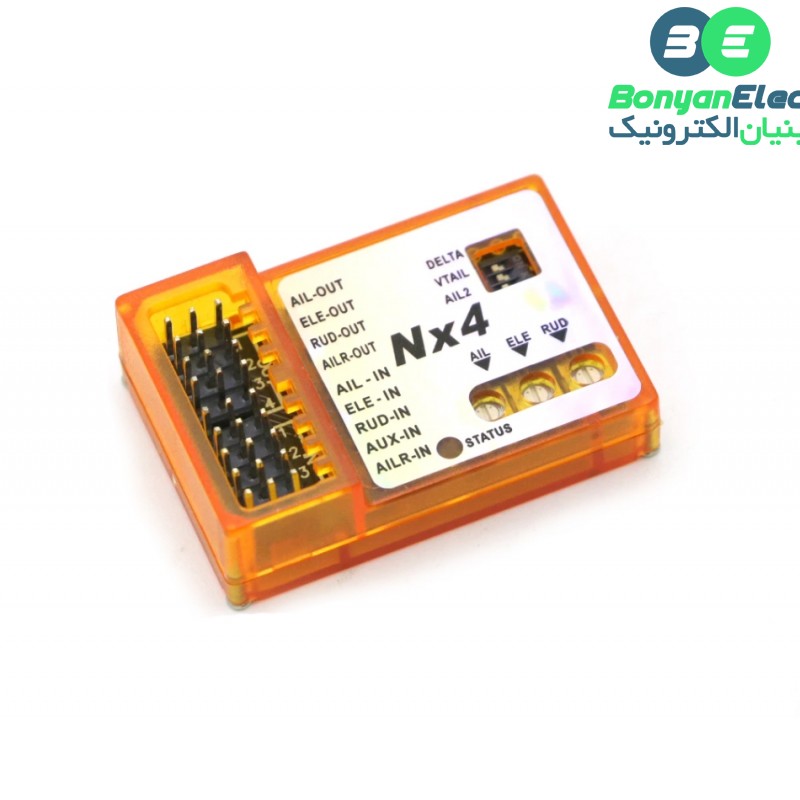
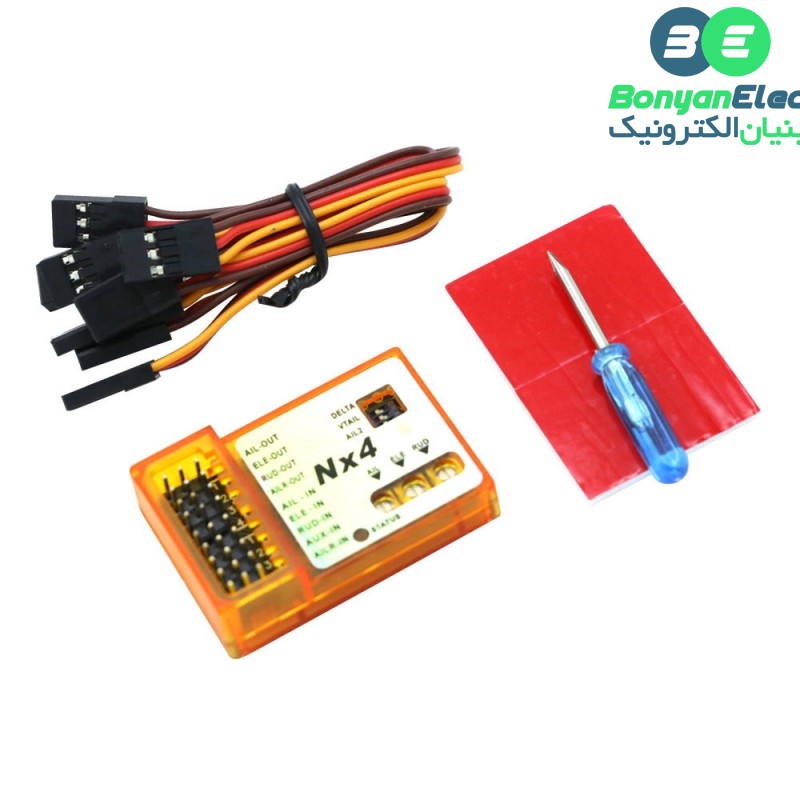
فلایت کنترل ZMR مدل Nx4 Pro – مناسب هواپیماهای RCفلایت کنترل ZMR مدل Nx4 مناسب هواپیماهای RC دارای ژیروسکوپ داخلی و حالات مختلف پرواز
2,559,000 تومان
موجود در انبار
نقد و بررسی اجمالیفلایت کنترل ZMR مدل Nx4 مناسب هواپیماهای RC دارای ژیروسکوپ داخلی و حالات مختلف پرواز
فلایت کنترل هسته و مغز متفکر تمام مولتی روتورها و پهپادها میباشد به صورتی که کنترل کامل پرنده را در اختیار اپراتور قرار می دهد و به بیانی دیگر هر تغییر فرمانی که به روی مولتی روتور مشاهده می شود توسط کاربر و از راه دور به وسیله ی رادیو کنترل با افزایش یا کاهش RPM اعمال می شود. فلایت کنترل ZMR مدل Nx4 Pro با دارا بودن چندین حالت پرواز متعدد وابعاد و وزن کوچک امکانات متنوعی را برای اپراتور وسیله پرنده فراهم میکند.
مشخصات:
- نوع کالا: فلایت کنترل
- مدل: ZMR Nx4 Pro
- ولتاژ: 5 ولت DC
- دارای ژیروسکوپ سه محوره
- ابعاد: 45*30*13 میلی متر
- فرکانس کاری: 100 کیلو هرتز
- وزن کامل: 40 گرم
- دمای قابل کار: 20- الی 50 درجه سانتی گراد
ویژگی ها:
- دارای چهار مدل پشتیبانی شامل: single aileron, dual ailerons, flapperons, delta and vtail.
- دارای سه حالت پرواز شامل: Rate Mode , Hold Mode , Gyro Off Mode
- دارای دو نوع حالت کنترل شامل: Master Gain، Axis Gain
- استفاده از الگوریتم کامل برای ایجاد کنترل پرواز راحت
- دارا بودن حالت پرواز اضطراری
- دارای تراز اتوماتیک در حالت بادی
وضعیت LED:
- LED خاموش: NX4 در حالت ژیروسکوپ خاموش.
- LED روشن: NX4 در حالت Rate Mode.
- LED در حالت فلاش: NX4 در حالت Hold Mode.
نکته: فلایت کنترل ZMR Nx4 Pro بهصورت مستقیم از ماژول nRF24L01 پشتیبانی نمیکند و ورودیهای آن برای سیگنالهای استاندارد رسیور RC؛ مانند PPM، SBUS یا IBUS طراحی شدهاند.
Specification:
- Voltage Range: DC 5V
- Response frequency: 100Hz
- Operating temperature: -20 to +50 °C
- Dimensions: 45 x 30 x 13 mm
Feature:
1.Four Model Types supported: single aileron, dual ailerons, flapperons, delta and vtail.
2.Three Flight Modes supported:
a. Rate Mode ,Rate Mode for offset correction.
b. Hold Mode ,HOLD mode for attitude hold
c. Gyro Off Modehvh,transsmiter control the plane directly.
3.Two kinds of Gain Control Method supported:Master Gain from the radio, Independent Axis Gain from the Variable resistor on the Controller board.
4.Using superior algorithm, Bring a more comfortable and more sensitive sense of control.
VERY IMPORTANT:
The Controller has to re-learn center position after installation, or replacing a new radio system, or making a trimming(or Sub-Trim)change within the transmitter, otherwise the servos may move to one side automatically when switching to hold mode.To do this,just quickly flip the flight mode switch twice between rate mode and hold mode within 1 second!
Status LED Description:
- LED OFF: NX4 in Gyro Off Mode.
- LED ON: NX4 in Rate Mode.
- LED flash: NX4 in Hold Mode.
WARNING:
PLEASE READ THE FOLLOWING STEPS VERY CAREFULLY BEFORE YOU START TO INSTALL A NEW PLANE!
- Step 1: Mounting
The board need to be firmly mounted near the center of the gravity of the plane by using the double-tape provide.Please make sure the longer side of the board is along with the heading direction.After mounting ,please check again if the board is attached firmly in the plane. - Step 2: Model Type Selection
The DIP switches set the WING mode,Please match the type of your aircraft with Normal Airplane(single aileorn),Normal Airplane(dual aileron for flapperon), Delta-wing (Flywing-wing)and V-tail according the pictures 1 to 4. if you change any DIP switch settings, power cycle the device to enable the new setting to take effect. - Step 3: Wiring
Please connect the control board and the radio receiver using wires provide according the pictures above for normal, V-Tail, Delta and single aileron planes. Pay attention to the color of wires to avoid anti-plug. - Step 4: Switch and Master Gain Channel Configure
Assign a 3-pos switch to the channel which connected the pins”IN-4”(AUX-IN) for switching the flight mode in flight.When use a 2-pos swtich,you can only switch between Rate Mode and Hold Mode,So you can not switch to Gyro Off Mode.It will be set to Rate Mode by default if switch channel is not connected to the board. If your transsmiter has Travl Adjust Function(End Point Adjust Function),you can change the switch channel’s End Point to change Master Gain. - Step 5: Gyro direction and Gyro Gain configure
Befor flight, you have to verfy that the gyro compensation direction is OK, otherwise, it could lead to losing control or even crash during the flight!the VR gain POTs on the NX3 control the correction gain and direction for each of the pitch (ELE), roll (AIL) and yaw (RUD) axis.
5 o’clock = max gain in one direction
12 o’clock = zero gain
7 o’clock = max gain in opposite direction
To perform the examination,power on the
board,pick the plane up and check it by
following the six steps below: - Step 6: re-learn center position
Quickly flip the flight mode switch twice between rate mode and hold mode within 1 second!
دیدگاه کاربرانفلایت کنترل ZMR مدل Nx4 مناسب هواپیماهای RC دارای ژیروسکوپ داخلی و حالات مختلف پرواز
برای ثبت دیدگاه، لازم است ابتدا وارد حساب کاربری خود شوید. اگر این محصول را قبلا از این فروشگاه خریده باشید، دیدگاه شما به عنوان مالک محصول ثبت خواهد شد.
نظر خود را در مورد این محصول بنویسید ...
افزودن دیدگاه
پرسش و پاسخفلایت کنترل ZMR مدل Nx4 مناسب هواپیماهای RC دارای ژیروسکوپ داخلی و حالات مختلف پرواز
هنوز پرسشی ثبت نشده است.
شما هم درباره این کالا پرسش ثبت کنید
ثبت پرسش جدید
ثبت پرسش جدید
برای ثبت پرسش، لازم است ابتدا وارد حساب کاربری خود شوید
به این پرسش پاسخ دهید
برای ثبت پرسش، لازم است ابتدا وارد حساب کاربری خود شوید
محصولات مشابه


دیدگاهها0
هیچ دیدگاهی برای این محصول نوشته نشده است.